Clear Browser Cache
The Daktela web interface is not displaying correct data or usual controls are missing.
Solution
Incorrect display of data or controls may be caused by historical data stored in your browser's cache. Follow these steps to clear this data.
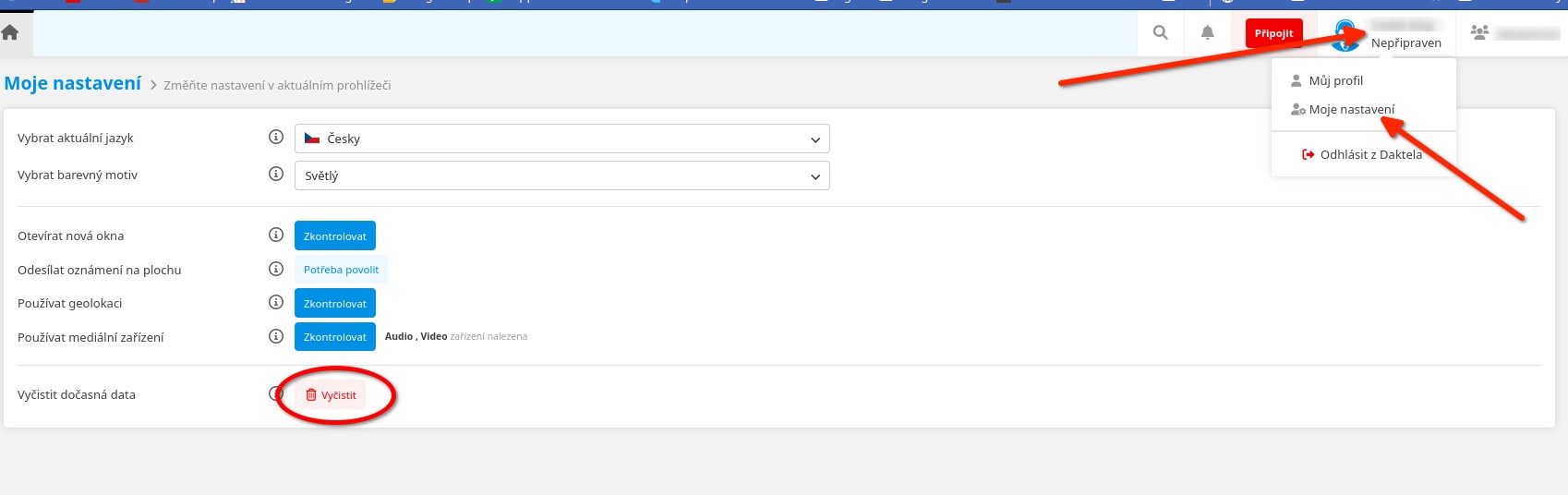
- Click on your profile settings in the top right corner of the Daktela window.
- Then click on "My Settings".
- And in the following menu, click the "Clear" button.
Info
If clearing temporary data doesn't help, please try using an incognito/private browser window or open the Daktela page in a completely different web browser.
Didn't find a solution to your problem? Our technical support colleagues will be happy to help. Before you call or write to us, please prepare information that will help us resolve your issue as quickly as possible.