Daktela Mobile App Not Working
I cannot launch the Daktela mobile app or log in
Solution
- Check that you have the latest version of the Daktela mobile app.
- Try reinstalling the app (https://play.google.com/store/search?q=daktela&c=apps or https://www.apple.com/search/daktela?src=globalnav).
-
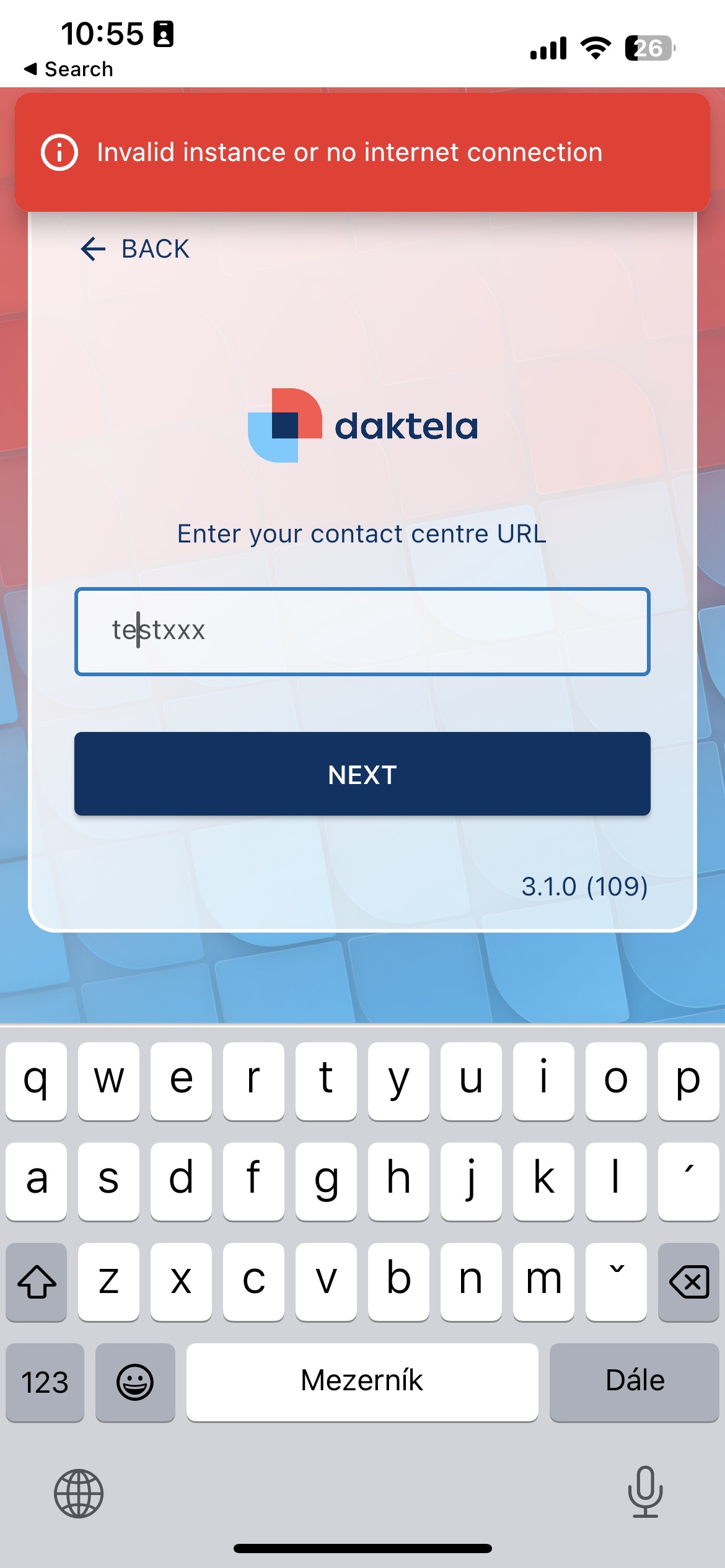
If the app launches but you cannot log in, please check that you are entering the correct instance, username, and password. The instance can be entered in two ways:
-
Full name mycompany.daktela.com (replace mycompany with your Daktela instance name)
- Short form - just mycompany (without the .daktela.com suffix - replace mycompany with your Daktela instance name)
-
You can only enter your username and password after entering the instance correctly, otherwise an error message will appear:
Info
If you are sure you are entering the instance correctly and still cannot log in, check your internet connection. You can also try opening your Daktela instance in a mobile browser.
Didn't find a solution to your problem? Our technical support colleagues will be happy to help. Before you call or write to us, please prepare information that will help us resolve your issue as quickly as possible.