Public JavaScript API
Everything a host page can use to control the embedded chat widget from its own scripts.
The widget mounts in Shadow DOM inside the host document — there is no iframe, so all calls are ordinary same-realm JavaScript. Two globals form the contract:
| Global | Owner | Purpose |
|---|---|---|
window.daktelaAiChatConfig |
host page | where to load the widget from |
window.daktelaAiChat |
widget | the API described below |
Installation
Your embed code is in the CODE tab of the publish panel, next to the widget settings. Paste it into the page as a single block — it carries the configuration, installs the command queue and loads the widget itself.
<script>
  window.daktelaAiChatConfig = {
      url: "https://my-instance.bot.coworkers.ai",
      daktelaAiChatId: "abc123",
  };

  (function(){var e=window.daktelaAiChatConfig;if(!window.daktelaAiChat||!window.daktelaAiChat.__isProxy){var t=[];window.daktelaAiChat=new Proxy({queue:t,__isProxy:!0},{get:function(e,n){return n in e?e[n]:function(){var e={m:n,a:[].slice.call(arguments),t:Date.now()};return t.push(e),new Promise(function(t,n){e.resolve=t,e.reject=n})}}})}var n=document.createElement(`script`);n.defer=!0,n.crossOrigin=`anonymous`,n.src=e.url.replace(/\/+$/,``)+`/chat-window-public-api/loader/dai-loader.js`,document.head.appendChild(n)})();
</script>
The only part of the snippet intended for editing is daktelaAiChatConfig.
How loading works
The widget itself is downloaded lazily — for example on open() or a launcher click. Anything you call before that just queues up, and once the widget loads, it all runs in the exact order you called it — nothing is lost.
Every queued call hands back a promise, so await works before the widget exists too:
getRegisteredTools() is the exception: before the widget loads there is nothing registered for it
to report, so its result is only meaningful once the widget is running.
Window control
open()
Opens the chat window. Triggers the lazy download on first use. Safe to call again — it won't do anything extra.
close()
Closes the window and, by default, ends the conversation: with
configuration.identity.closeResetsSession at its default true, the session is reset and
the next open starts a fresh discussion. Set that option to false to make close() only
hide the window.
restart(options?) / restartAndOpen(options?)
Discards the current conversation and starts a new one. restartAndOpen also opens the
window.
| Option | Type | Effect |
|---|---|---|
retainContextKeys |
string[] |
Context keys copied into the new conversation. Everything else is dropped. Unknown keys are ignored. |
Without options the whole context is cleared.
restartAndClose()
Closes the window. Despite the name it does not restart the conversation — whether the
session ends is decided by closeResetsSession, exactly as with close().
destroy()
Disconnects, unmounts the widget, clears registered tools and analytics, and removes
window.daktelaAiChat. Use when the host page tears down the chat (e.g. an SPA route
change). Calls made afterwards have no effect.
Identity
Identity is how you tell the widget who the visitor is, so their conversation history follows the person rather than the browser. The widget cannot take your word for it — it presents a token your identity provider signed, and the platform verifies it.
Setting it up (the signing key, the claims, session lifetimes) is covered in Authenticate Visitors. This section is the method reference.
authorize(jwt, refreshJwt?)
const result = await window.daktelaAiChat.authorize(
  jwt,
  async () => fetchFreshJwt(),   // called when the session expires
);

if (!result.authorized) {
  console.warn('Chat authorization failed:', result.reason);
}
Verifies jwt and switches the chat onto the resulting session.
It always resolves — a token that fails verification comes back as { authorized: false, reason }
rather than throwing, so a fire-and-forget call can't produce an unhandled rejection. reason is one
of invalid_token, not_configured, network_error or superseded.
The second argument is the function the chat calls for a new token once the session expires. It must return a token that is still valid — which may be the same one as before: what runs out is the chat session, not your token, so a cached token that has not expired yet is a good answer. An expired token, an empty value, throwing, or never settling signs the visitor out instead of retrying.
Tip
The recommended moment is page load, as soon as the token is available — rather than when the visitor opens the chat. A session belongs to one browser tab, so a returning visitor has none until this runs. Calling it later works and nothing is lost, but it costs an extra round trip and a visible reconnect.
authorize() on its own doesn't download the chat bundle. Until something else triggers the load —
open(), or the visitor clicking the launcher — the call just sits in the queue.
startDiscussion(userToken?)
Moves the visitor onto another conversation, or starts a fresh one when called with no argument. The server still checks the conversation belongs to this visitor and refuses it otherwise.
| When you call it | What happens |
|---|---|
| Before the chat window is open | The handle is adopted and the conversation is created under it. Nothing is discarded, because nothing has started yet. |
| While the visitor is chatting | The connection moves to the other conversation and the transcript on screen is cleared with it — leaving the old messages up would show a conversation the connection no longer belongs to. |
| With the handle already in use | Nothing. |
A handle the visitor doesn't own is refused by the server, and the widget recovers on its own: the refused handle is dropped and a conversation of their own starts instead. Worth knowing if your page holds a handle across a sign-out — the conversation from before the visitor signed out isn't theirs any more, and handing it back can't reopen it.
A handle pointing at a conversation that has finished is different: it opens read-only, with the transcript on screen and the composer locked. That's the conversation the visitor had, so they're shown it rather than having it taken away; the bot's closing message carries the button that starts a new one.
It does not end the conversation the visitor is leaving — that one stays open on the server, so
they can be taken back to it later. To end it, call finishDiscussion() first:
finishDiscussion()
Ends the current discussion on the server and leaves the window exactly as it is — the transcript stays on screen and renders read-only, the way a finished chat always does. Nothing is closed and nothing is reset, so you can end one conversation and begin another without the window flickering in between.
Use restart() instead when you want the window returned to a fresh conversation in one step.
setUserToken(userToken)
Deprecated. The previous name of startDiscussion(userToken), which it now forwards to. Calling
it logs a warning.
logout()
Revokes the session on the server for every tab and device, and switches this one to an anonymous identity with the local history cleared. It is intended for the moment the visitor signs out of your website.
What it deliberately does not do:
- End the conversation. The discussion stays open and is marked with a note in the transcript. The visitor can't carry on in it anonymously, but signing in again takes them back to it.
- Forget the browser. The next anonymous visit is recognised as the same browser, which by then owns nothing of the signed-in account.
Language
setLanguage(languageCode)
Switches the interface language. languageCode is the language's two-letter ISO code — en, cs, sk and so on.
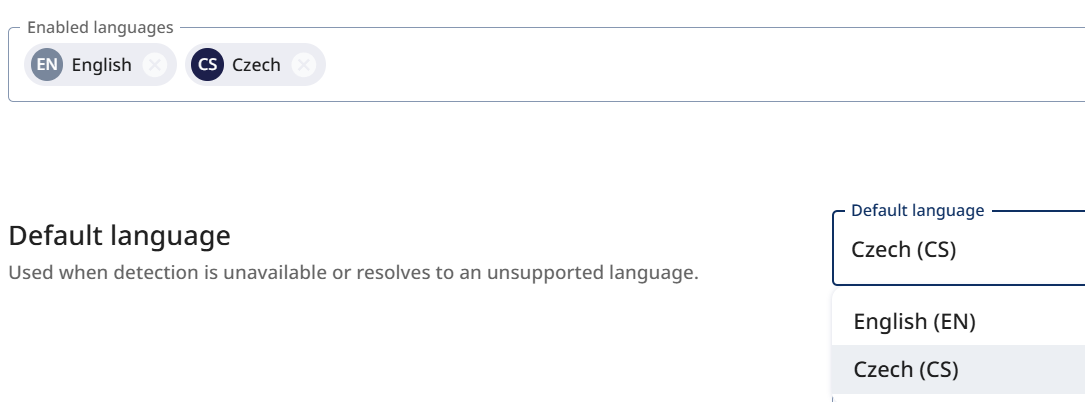
The code must belong to one of the widget's enabled languages (configuration.languages.enabledLanguages) — otherwise the call
is rejected with a console error and nothing changes. You enable languages in the admin
(chat window detail → Languages) and publish; the widget only ever reads the published
configuration. That same screen is also where you find the code of each enabled language.
Note
setLanguage() expects language codes in lowercase, e.g. setLanguage('cs').
resetLanguage()
Drops the override and returns to the configured detection.
Conversation context
Context is a set of key/value pairs the bot can read — order number, plan, cart size.
Keys must be written the way bot platform names its variables: a leading $ followed by a
single word, no spaces — $orderId, not orderId or $order id. A key that does not match
is dropped with a console error, because the bot could never resolve it.
The admin Options tab can preset context pairs. Those seed every discussion the widget
starts, including the one after a restart, so they act as defaults; an addContext() /
setContext() call from the host page overrides the same key for the current discussion.
addContext(context)
window.daktelaAiChat.addContext({
  $orderId: 'A-1234',
  $plan: 'premium',
  $note: { value: 'expires soon', lifespan: 3 },
});
Accepts a plain object. Scalars are wrapped automatically; pass { value, lifespan } to
limit how many bot turns an entry survives. Keys are merged, not replaced. Sent immediately
when a conversation is live, otherwise attached to the next one. Keys that break the $name
rule are skipped; the rest of the object still applies.
setContext(key, value)
The single-entry form of addContext. The same $name key rule applies.
Appearance
setCustomCss(cssText) / resetCustomCss()
Injects raw CSS into the widget's Shadow DOM. Takes effect only once the bundle is loaded.
Two things to know, both common causes of "nothing happened":
- Custom CSS is inserted before the widget's own stylesheet, so rules almost always need
!important. - Selectors must match real classes. The useful ones are
.daktela-ai-window,.daktela-ai-header,.daktela-ai-launcher-button,.daktela-ai-message-buttonand.daktela-ai-home-screen.
The widget logs a warning whenever custom CSS is applied. That is deliberate — class names are not a stable contract, so re-test custom CSS after widget updates.
Page-action tools
The Agent module — the LLM that drives your dialogs — can use tools in addition to its prompt. One type is API Integrations, which call your backend endpoints. Page-action tools are the second type: a JavaScript function running right on your page, which you register with registerTool() — letting the Agent call back into your site (look up an order, highlight an element, open a ticket) without any data ever leaving the visitor's browser.
registerTool(tool)
window.daktelaAiChat.registerTool({
  name: 'openTicket',
  description: 'Opens a support ticket and returns its id.',
  parameters: {
    type: 'object',
    properties: { subject: { type: 'string' } },
    required: ['subject'],
  },
  confirm: true,
  handler: (args) => ({ ticketId: createTicket(args.subject) }),
});
| Field | Type | Notes |
|---|---|---|
name |
string |
Unique; re-registering the same name replaces the tool. |
description |
string |
What the assistant reads to decide when to call it. |
parameters |
JSON Schema | Object schema. Only top-level required and primitive types are validated. |
handler |
(args) => unknown |
Sync or async. Never leaves the browser. |
confirm |
boolean |
Optional. Shows an approve/decline prompt before running. |
A handler may return any JSON-serialisable value; it is passed back to the assistant. Errors
are reported as handler_error, a handler exceeding 30 seconds as timeout, a declined
prompt as user_declined.
Timing: the registered set is attached to every outgoing visitor message, not to the initial handshake. Register tools before the visitor sends their first message — the bot's opening turn does not see them.
Info
Registering a tool makes it available to the Agent, but doesn't by itself tell it when to use it. Just like with API Integrations, mention the tool (by its name) directly in the Agent's instructions — e.g. "Use the openTicket tool when the customer wants to open a support ticket."
unregisterTool(name) / getRegisteredTools()
getRegisteredTools() returns the schemas currently in effect (without handlers), which is
what an outgoing message carries.
Legacy ew-* custom events
These exist for one reason: so a site already integrated with the previous chat window keeps working after the upgrade, without touching its code. The event names, payloads and effects match the old widget.
For anything new, use the JavaScript API above — it is the supported surface, it covers more, and it reports errors. The events are maintained for compatibility only.
Dispatch them on window:
| Event | Effect | API equivalent |
|---|---|---|
ew-open-window |
Opens the window | open() |
ew-hide-window |
Hides the window without ending the conversation | — |
ew-toggle-window |
Opens or hides | — |
ew-end-discussion |
Ends the conversation on the server so the assistant can say goodbye and ask for a rating; the window stays open. Repeating it once the conversation is over closes and starts fresh. | — |
ew-reset-chat |
Starts a new conversation, window state unchanged | restart() |
ew-close-and-reset-chat |
Closes the window and starts a new conversation | restartAndClose() |
add-context |
One context entry, detail: { key, value } |
setContext(key, value) |
chatbot-ew-context-set |
Whole context object in detail |
addContext(object) |
ew-set-dark-mode |
Forces the dark theme | — |
ew-set-light-mode |
Forces the light theme | — |
ew-set-system-theme-mode |
Follows the operating system theme | — |
ew-enable-ga / ew-disable-ga |
Toggles Google Analytics reporting. ew-disable-ga stops Google Analytics only — Google Tag Manager keeps receiving events, matching the old widget's behaviour. |
— |